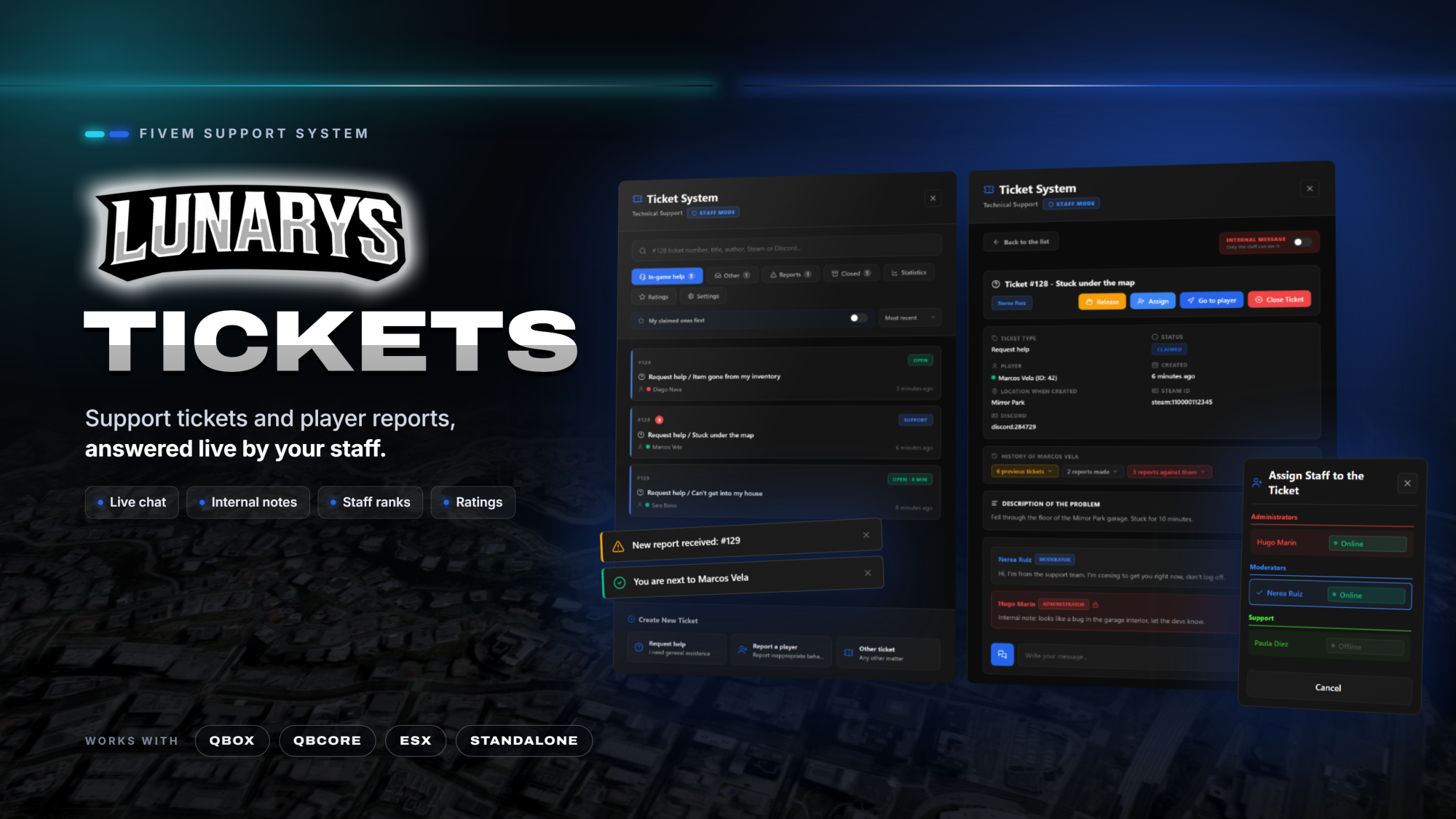
LunarysTickets: soporte y reportes con chat en directo con el staff
Un panel que se abre con F5 o con /tickets: el jugador abre un ticket de una categoría (ayuda, reporte, otros... las que quieras), chatea en directo con el staff y, al cerrarse, valora la atención. El staff reclama, asigna, responde con respuestas rápidas, deja notas internas, va al jugador y cierra.
Cada rango de staff tiene sus permisos y sus categorías, y hay estadísticas, valoraciones y registro en Discord. En español e inglés.
Lo que trae:
• Categorías a tu gusto: cada una con su pestaña, icono y color, el rango mínimo que la ve y si pide evidencias. El jugador ve al staff como «Soporte» con el nombre de tu servidor.
• Reportes entre jugadores: se reporta a uno o varios por su ID de servidor, también si se han ido hace poco. El reportado recibe un aviso y puede contestar; entre jugadores nadie ve el nombre del otro.
• Herramientas del staff: reclamar, asignar (también a alguien desconectado), respuestas rápidas, notas internas, ir al jugador, historial de tickets y reportes anteriores y búsqueda por número, título, autor, Steam o Discord.
• Rangos y permisos: los rangos de tu framework o el ACE propio, y lo que puede hacer cada rango (reclamar, reabrir, borrar mensajes, ver valoraciones). Todos los personajes de una cuenta cuentan como un solo miembro del staff.
• Staff implicado: en sus propios tickets y en los reportes contra él, un miembro del staff es un jugador más: no ve las notas internas ni puede reclamarlo, cerrarlo ni valorarse.
• Cierre con motivo y comentario opcionales, estadísticas y valoraciones del staff y registro en Discord de lo que elijas.
• Avisos en una esquina de la pantalla que cada jugador mueve y ajusta en Ajustes, o en tu propio sistema de notificaciones.
Qué incluye y qué no:
LunarysTickets funciona por sí solo: no necesita LunarysLaptop, ninguna app ni ningún otro script de Lunarys. Trae el panel del jugador y del staff, los reportes, las estadísticas, las valoraciones y el registro en Discord por webhook. Las categorías, los rangos, los motivos de cierre y las respuestas rápidas se cambian en el config y en los locales; la carpeta custom tiene ganchos (creado, reclamado, cerrado, valorado...) para premios o registros y la conexión con tu script de ID.
Compatibilidad: Qbox, qb-core, ESX o sin framework, se detecta solo; otro framework, desde la carpeta custom. Necesita oxmysql y servidor con OneSync; las tablas se crean solas. Textos en español e inglés. Protegido con escrow; la configuración, el bridge, la carpeta custom, los locales y la carpeta install van abiertos.
Lee la guía completa en Documentación.
[EN]
LunarysTickets: support and reports with live chat with the staff
A panel that opens with F5 or /tickets: the player opens a ticket of a category (help, report, other... whatever you want), chats live with the staff and, once it is closed, rates the attention. The staff claims, assigns, answers with quick replies, leaves internal notes, goes to the player and closes.
Every staff rank has its own permissions and categories, and there are statistics, ratings and Discord logs. In English and Spanish.
What you get:
• Categories your way: each one with its tab, icon and colour, the lowest rank that sees it and whether it asks for evidence. Players see the staff as "Support" with the name of your server.
• Player reports: one or several players are reported by their server id, also if they left a few minutes ago. The reported player gets a notice and can answer; between players nobody sees the name of the other.
• Staff tools: claim, assign (also to someone offline), quick replies, internal notes, go to the player, history of previous tickets and reports, and search by number, title, author, Steam or Discord.
• Ranks and permissions: the ranks of your framework or its own ACE, and what each rank can do (claim, reopen, delete messages, see ratings). All the characters of one account count as a single staff member.
• Staff involved: in their own tickets and in reports against them, a staff member is a normal player: no internal notes, no claiming, closing or rating themselves.
• Closing with optional reason and comment, staff statistics and ratings, and Discord logs of whatever you choose.
• Notices in a corner of the screen that each player moves and adjusts in Settings, or in your own notification system.
What is included and what is not:
LunarysTickets works on its own: it needs neither LunarysLaptop, nor any app, nor any other Lunarys script. It brings the player and staff panel, the reports, the statistics, the ratings and the Discord logs by webhook. Categories, ranks, closing reasons and quick replies are changed in the config and the locales; the custom folder has hooks (created, claimed, closed, rated...) for rewards or logs and the connection with your ID script.
Compatibility: Qbox, qb-core, ESX or no framework, detected automatically; any other framework, from the custom folder. Requires oxmysql and a server with OneSync; the tables are created automatically. Texts in English and Spanish. Escrow-protected; the config, the bridge, the custom folder, the locales and the install folder are open.
Read the full guide under Documentation.
Cliente TOP
Todavía no hay nadie destacado.No top supporter yet.
Pagos Recientes
-
 Cristian_betancor LunarysCoins · 23,99 €
-
 Kandrus LunarysCoins · 7,99 €
-
Kandrus LunarysCoins · 7,99 €
-
 Araceli_Lopez LunarysCoins · 19,99 €
-
Kandrus Tarjeta Regalo 20 EUR · 19,99 €
Devoluciones
¿Puedo devolver algún producto?
Lamentablemente, no es posible realizar devoluciones. Sin embargo, nuestro equipo de atención está disponible las 24 horas del día, los 7 días de la semana, para ayudarte con cualquier consulta o incidencia que tengas.
[EN]
Can I get a refund?
Unfortunately, refunds are not possible. However, our support team is available 24 hours a day, 7 days a week, to help you with any question or issue you may have.